Lovable AI: The Beginner-to-Confident Guide to the AI App Builder

Lovable AI is a "vibe coding" platform that turns a plain-English description into a working full-stack web app. You chat, it generates a React and Tailwind front end plus a Supabase backend with auth, then deploys it. It's strongest for MVPs, prototypes, and internal tools — not yet complex production systems.
A few years ago, turning an idea into a working web app meant learning to code, or hiring someone who could. Lovable belongs to a new category that compresses that gap: you describe what you want in a chat box, and a few minutes later you have a running app with a database and a login screen. The category has a nickname — “vibe coding” — and Lovable is one of its most popular tools. This guide takes you from “what is this” to building with realistic expectations: how the workflow actually goes, what the backend really is, what you can ship, where it breaks, and how the credit pricing works.
What Lovable is, exactly
Lovable (at lovable.dev) is an AI-powered app builder that turns a plain-English description into a full-stack web application. You type what you want; it generates a front end in React and Tailwind CSS, wires up a backend with a database and authentication, and gives you a live preview you can keep refining by chatting. When you’re happy, it deploys.
The key idea is that you work in natural language, not code. You’re not opening files or running a terminal — you’re having a conversation with a system that writes and edits the code for you behind the scenes. That’s what makes it accessible to founders, designers, product managers, and curious beginners who’d never call themselves developers.
It helps to place Lovable in the wider toolkit. It sits at the “describe it and ship it” end of the spectrum. At the other end are AI code editors built for people who want to read every line — our roundup of the best AI for coding maps that full range. Lovable’s promise is speed and accessibility; the trade-off, as we’ll see, is control.
Getting started: your first app in minutes
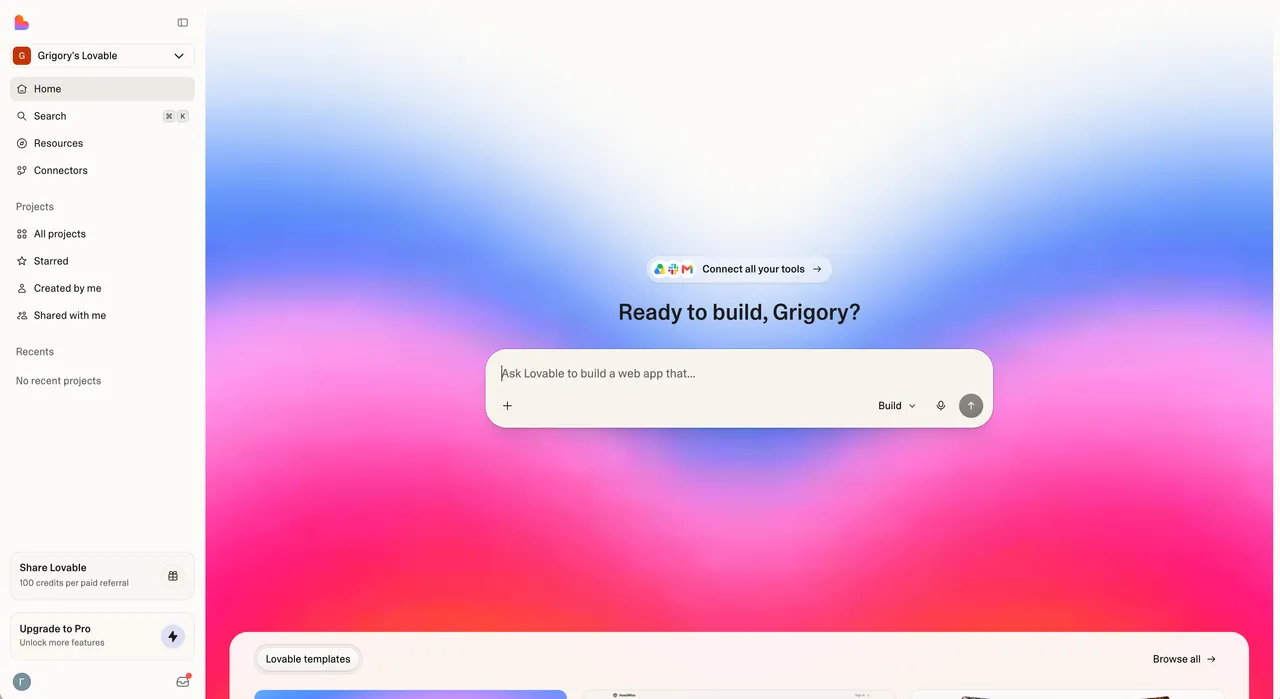
The on-ramp is deliberately short. Here’s the path from zero to a live preview:
- Sign up at lovable.dev with an email or Google account. The Free plan starts immediately — no credit card.
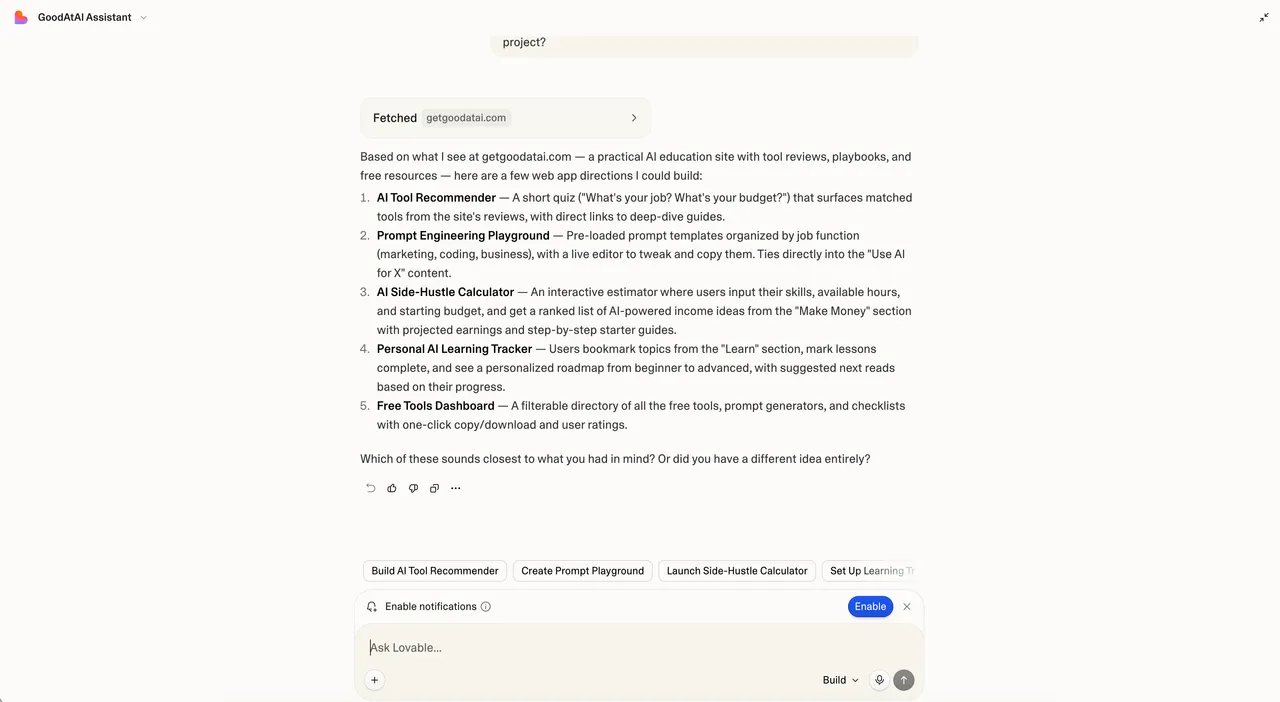
- Describe your app in the chat box. Be specific: “a habit tracker where users log in, add daily habits, check them off, and see a weekly streak” beats “a habit app.”
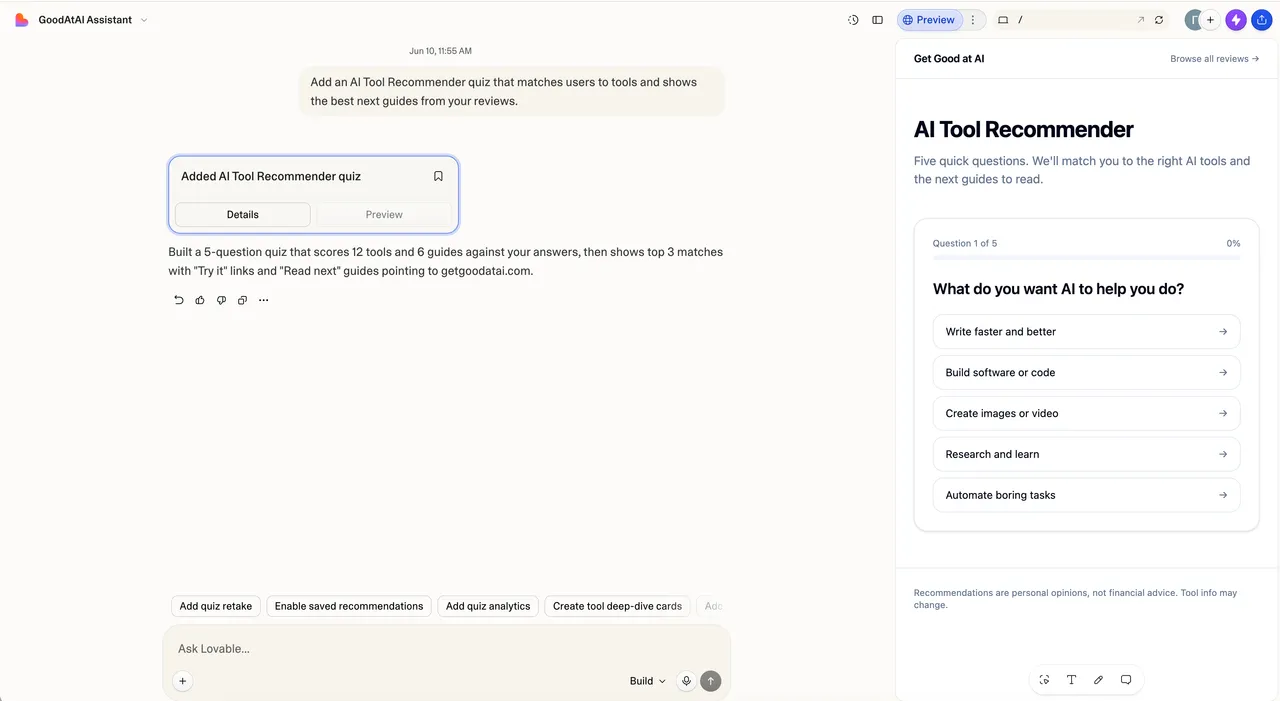
- Watch it build. Lovable generates the screens, components, and starter data structure, then shows a live, clickable preview on the right.
- Iterate by chatting. Ask for changes in plain English: “make the header dark,” “add a delete button to each habit,” “show a chart of completions this month.”
- Add a backend when you need real data to persist — Lovable sets up the database and login for you (more on this below).
- Deploy with a click to a
lovable.appsubdomain on the free tier, or a custom domain on a paid plan.
One habit to form on day one: start small and verifiable. Get a single screen working and looking right before you ask for the next feature. Asking for the whole app in one giant prompt almost always produces a tangled result that’s hard to fix.
The core workflow: prompt, preview, iterate
The loop you’ll spend most of your time in is simple: you prompt, Lovable edits, you check the preview, you prompt again. A few skills make that loop go smoothly.
Be concrete and incremental. The AI is good at standard patterns — lists, forms, dashboards, login flows — and worse at guessing your intent. One clear change per message beats a paragraph of vague wishes. Think “tickets,” not “epics.”
Use visual editing for small tweaks. Lovable lets you click an element in the preview and adjust things like text, spacing, or color directly, instead of spending a credit on a chat message for every cosmetic change. For small styling fixes, this is faster and cheaper.
Point at problems precisely. When something looks wrong, describe exactly what and where: “the submit button on the signup form does nothing when clicked” gets a far better fix than “signup is broken.” If you can see an error, paste it in.
Commit your wins. Lovable keeps a version history so you can roll back a bad change. Use it freely — restoring to a known-good point is much cheaper than nursing a broken state forward through more prompts.
The mental model that helps most: you’re directing a fast, eager junior developer who has built a thousand apps but knows nothing about yours until you tell it. Clarity in, quality out.
The backend: Supabase and Lovable Cloud
A front end alone is just screens. The moment you need data to persist, users to log in, or files to upload, you need a backend — and this is where Lovable does real work for you.
Under the hood, Lovable uses Supabase, an open-source platform built on PostgreSQL. It provides the database, authentication, file storage, and serverless functions that a real app needs. You don’t configure any of it by hand; you describe the feature (“users should be able to upload a profile photo”) and Lovable creates the tables, rules, and code to make it work.
There are two ways to get this backend:
- Lovable Cloud — a managed, one-click backend built on Supabase. You get a database, auth, storage, and functions without creating a separate account or touching keys. This is the fastest path and the right choice when you’re validating an idea (per Supabase’s launch announcement, 2026).
- Your own Supabase project — connect a Supabase account you manage directly. You get more control, predictable pricing, and full access to the dashboard. This is the better path once a project is serious or you want to own the infrastructure (Lovable docs, 2026).
A word of caution that the marketing won’t lead with: AI is good at creating backend features and less reliable at securing them. It commonly leaves database access rules too permissive. Before any real launch, have someone check that users can only read and write the data they should.
GitHub sync: you own the code
A fair worry about chat-to-app tools is lock-in: if the platform owns your code, you’re stuck. Lovable handles this with two-way GitHub integration.
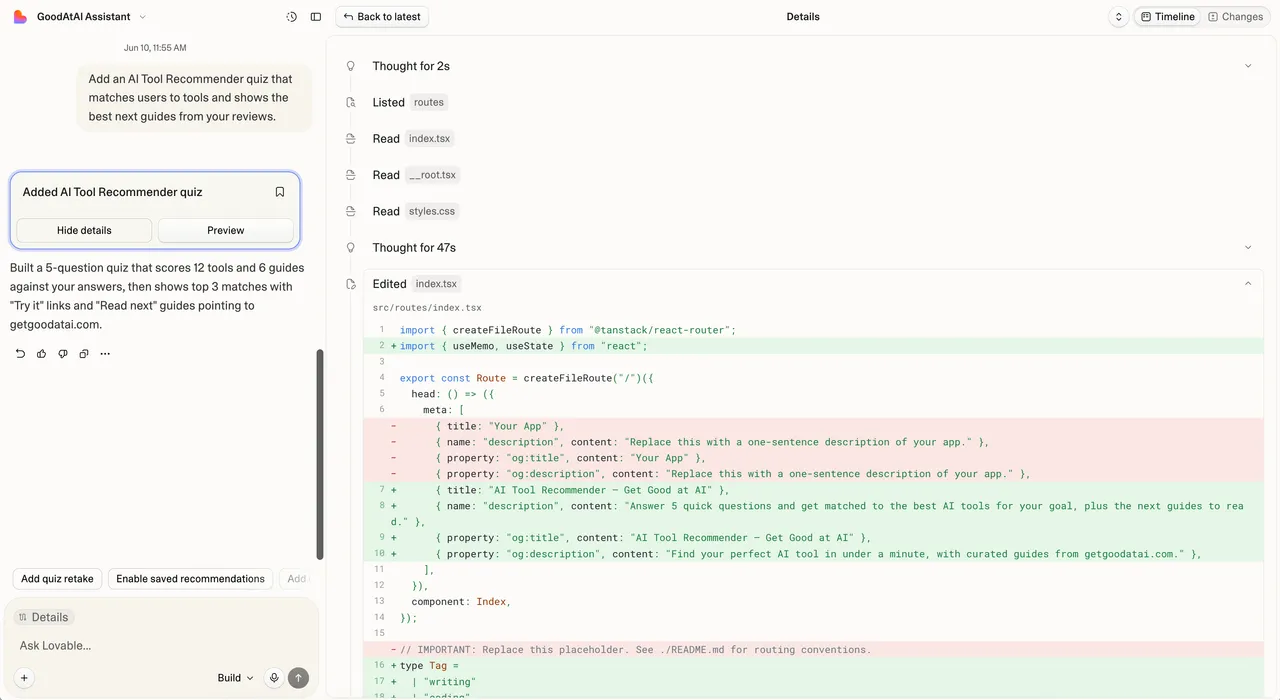
- Every change Lovable makes is automatically committed to your connected GitHub repository.
- Any change you (or a developer) push to GitHub flows back into Lovable.
- The code is standard React, Tailwind, and Supabase — not a proprietary format — so a developer can pick it up and run with it.
In practice, this means Lovable can be a starting point rather than a cage. Build the MVP by chatting, then, when it outgrows what AI can comfortably maintain, sync to GitHub and hand it to an engineer who works in a tool like Cursor. The handoff is clean because the code was real all along.
What you can realistically build — and what you can’t
This is the most important section, because the honest answer is what separates a good experience from a frustrating one.
Lovable is genuinely good at:
- Landing pages and marketing sites
- MVPs and prototypes to put in front of users or investors
- Internal tools and dashboards
- Simple SaaS apps with login, a database, and CRUD screens (create, read, update, delete)
- Forms, directories, and content sites backed by a database
These share a trait: they’re built from standard patterns the AI has seen thousands of times. Auth, lists, forms, tables — well-trodden ground.
Lovable struggles or breaks down with:
- Complex, custom business logic with lots of edge cases
- Heavy real-time features (live collaboration, multiplayer)
- Unusual third-party integrations the AI doesn’t know well
- Strict security, privacy, or compliance requirements
- Large codebases, where the AI starts losing track and fixes cause new breakages
The pattern across both lists is the same. AI app builders are strong at the first 80% of a common app and weak at the last 20% of a complex one. As your app grows, you’ll notice the ratio flip — less time describing new features, more time fixing what the AI half-built. That crossover is the natural signal to bring in a developer. It’s a feature of the category, not a knock on Lovable specifically. This is also why understanding what agentic AI can and can’t do reliably is useful context before you bet a business on it.
Pricing: the credit model explained
Lovable charges by credits, and the model trips people up, so it’s worth understanding before you commit.
The core rule: you spend credits each time you send the AI a message. Not every message costs the same — a small styling change runs around half a credit, while a heavier request like adding authentication costs more (roughly 1.2 credits). Iterating a lot — which beginners always do — burns through credits faster than the headline numbers suggest.
Here are the tiers as of June 2026 (lovable.dev/pricing):
| Plan | Price | Credits | Best for |
|---|---|---|---|
| Free | $0 | ~5/day (capped ~30/month) | Trying it out, tiny experiments |
| Pro | $25/month | 100/month (+ daily free credits) | Building and shipping a real MVP |
| Business | $50/month | More credits + SSO, team features | Small teams collaborating |
| Enterprise | Custom | Pooled credits, controls, support | Larger organizations |
A few realities worth knowing:
- Daily free credits stack on every plan. All users get around 5 free credits a day, even on paid plans — handy for small daily tweaks.
- The real cost runs higher than the sticker. Between debugging, top-ups, and re-prompting, regular builders often land at $30–50/month once a project is active (per No Code MBA, 2026).
- Tidy prompts save money. Because each message costs credits, clear, specific requests that land the change on the first try are cheaper than vague ones you have to redo three times.
- Visual edits are nearly free. Use click-to-edit for cosmetic changes instead of spending a credit per tweak.
Practical advice: start Free, move to Pro the week the daily cap slows you down, and watch how fast credits drain in your first project before deciding you need more.
Lovable vs the alternatives
Lovable isn’t the only chat-to-app tool, and it isn’t the right one for every job. Here’s an honest at-a-glance comparison.
| Tool | What it is | Strongest at | Watch out for |
|---|---|---|---|
| Lovable | Chat-first full-stack app builder | Non-technical founders shipping a SaaS MVP; clean Supabase + GitHub flow | Complex logic; security review needed |
| Bolt (bolt.new) | In-browser AI builder | Throwaway prototypes; framework flexibility (React, Vue, Svelte); mobile via Expo | Less polished default UI than Lovable |
| v0 (Vercel) | AI UI and Next.js generator | Polished UI components inside a Next.js app; deploys to Vercel | Backend support newer and less mature |
| Replit Agent | AI inside a full cloud IDE | Built-in database, hosting, Python backends, persistent processes | More to learn; closer to real dev work |
| Cursor | AI code editor for developers | Full control, reading and steering every change | You write/own the project; not chat-to-app |
The decision usually comes down to two questions. First, how technical are you, and how much control do you want? If you’d rather not see code, Lovable or Bolt fit; if you want a real dev environment, Replit; if you’re a developer, an editor like Cursor. Second, what’s the job? A polished marketing UI leans v0; a quick throwaway test leans Bolt; a founder’s first SaaS MVP leans Lovable. Many people use more than one — Lovable to ship the MVP, then a developer-grade tool once it gets serious. If you’re choosing between developer tools specifically, our Claude Code vs Cursor comparison goes deep, and you can install Claude Code in a few minutes to try the terminal side.
Common mistakes (and how to skip them)
The gap between “tried Lovable” and “built something real with it” is mostly avoiding these:
- Prompting the whole app at once. A giant first prompt produces a tangled mess. Build one screen, get it right, then add the next.
- Burning credits on vague requests. Each fuzzy message costs the same as a precise one but is likelier to need a redo. Say exactly what and where.
- Skipping version control. Use Lovable’s history and connect GitHub early. A bad change should cost you a rollback, not an afternoon.
- Trusting the AI on security. Generated database rules are often too open. Review who can read and write what before any launch.
- Pushing past the ceiling. When you’re spending more time fixing than building, that’s the signal to bring in a developer — not to keep re-prompting the same broken feature.
- Paying for chat tweaks you could click. Use visual editing for cosmetic changes to save credits.
Tips for getting more out of Lovable
Once the basics click, these habits compound:
- Describe the data model early. Telling Lovable what your core “things” are (users, projects, tasks) up front leads to a cleaner database than bolting them on later.
- Ask for a plan first on big features. “Outline how you’d build this before changing anything” is cheap; untangling a wrong diff is not.
- Keep one feature per message. Tight scope gets better results and wastes fewer credits.
- Connect your own Supabase when it gets serious. You’ll want the dashboard, predictable pricing, and full control as the project grows.
- Sync to GitHub before a developer handoff. Clean repo in, clean handoff out.
- Test the deployed app, not just the preview. Things that work in preview can behave differently live, especially around auth.
The bottom line
Lovable earns its popularity honestly: it’s one of the smoothest ways to go from an idea to a deployed, full-stack web app without writing code, and the GitHub sync means you’re never locked in. Its real value is the first version — the MVP, the prototype, the internal tool you can ship in an afternoon. Its real limit is the same as every AI app builder’s: complexity. The last 20% of a serious app still needs someone who understands the code, the database, and the security underneath.
Used for what it’s good at, Lovable is a genuinely useful tool. Start free, build one small real thing, and you’ll quickly feel both the speed it gives you and the edge where AI hands the work back to humans.
Choosing your stack? Browse the full tools hub, and if you want the developer-grade side, read up on Cursor. New hands-on guides land regularly — subscribe to get the next one in your inbox.
Frequently asked questions
What is Lovable AI in simple terms?
Lovable is an AI app builder you talk to in plain English. You describe the app you want, and it generates a full-stack web app — a React and Tailwind front end with a Supabase backend, login, and a database — then lets you preview, edit, and deploy it. No setup or local coding required to start.
Is Lovable free?
There's a Free plan with about 5 credits a day (capped near 30 a month), private projects, and a lovable.app subdomain — enough to try a small idea. Real building usually needs the Pro plan at $25/month for 100 monthly credits, custom domains, and code editing (lovable.dev/pricing, 2026).
Do I need to know how to code to use Lovable?
No, to start. You can build and ship a basic app by describing it. But you hit a ceiling fast: when something breaks, or a feature gets complex, reading the generated code and understanding databases, auth, and deploys starts to matter. Lovable lowers the entry bar; it doesn't remove the need for judgment.
How does Lovable's credit pricing work?
Each message you send to the AI spends credits. A small styling tweak costs around half a credit; a bigger feature like authentication costs more. Free gives ~5/day; Pro includes 100/month. Heavy iteration burns credits faster than people expect, so many users top up (lovable.dev, 2026).
What backend does Lovable use?
Lovable uses Supabase — an open-source Postgres platform — for the database, authentication, file storage, and serverless functions. Lovable Cloud is a managed, one-click version of this built on Supabase, so you get a real backend without creating a separate account. You can also connect your own Supabase project for full control.
Can I export or own the code Lovable writes?
Yes. Lovable has two-way GitHub sync: it commits every change to your repository, and pushes you make on GitHub flow back into Lovable. That means you own the code and can move it to your own hosting or hand it to a developer. You're not locked into the platform.
What can you realistically build with Lovable?
Landing pages, marketing sites, MVPs, prototypes for investor or user feedback, internal dashboards, simple SaaS apps, CRUD tools, and forms with a database behind them. It shines when the app is mostly standard screens, data, and auth — the patterns AI has seen thousands of times.
Where does Lovable break down?
Complex business logic, heavy real-time features, unusual integrations, strict security or compliance needs, and large codebases where the AI loses the thread. As an app grows, you spend more time fixing what the AI half-built than describing new features. That's the point where a developer should take over.
Is Lovable better than Bolt, v0, or Replit?
It depends on the goal. Lovable is the smoothest default for non-technical founders shipping a SaaS MVP. Bolt offers more framework flexibility for throwaway prototypes; v0 is best for polished UI components inside a Next.js project; Replit gives a fuller dev environment with built-in database and hosting. None wins every case.
Is Lovable the same as Cursor?
No. Lovable is a hosted, chat-first app builder aimed at people who'd rather not open a code editor. Cursor is an AI code editor for developers who want to read and steer every change. Lovable gets you a deployed app faster; Cursor gives you far more control. See our /cursor-ai/ guide for the developer side.
Is Lovable safe for production apps?
For small, low-stakes apps and internal tools, often yes — but review the generated code, especially auth and database access rules. AI commonly leaves gaps in security (like permissive row-level access). For anything handling sensitive data or real payments, have someone who understands the stack audit it before launch.
Keep reading


Get good at AI — one practical email a week.
Tools, use cases, and shortcuts you can actually apply. No hype.