Higgsfield AI: What It Is and How to Use It (2026 Review)

Higgsfield AI is the cleanest way to add real cinematic camera motion to AI video without learning a 3D rig. It bundles top models behind preset controls and effects. The credit system and no-rollover billing are the catch, so match a plan to your actual output.
Pricing
| Plan tier | Roughly who it's for | What you get |
|---|---|---|
| Entry / low-cost | Trying it out, occasional clips | Small monthly credit pool, basic models |
| Mid (Plus) | Regular creators, social content | Larger credit pool, premium models unlocked |
| High (Ultra) | Heavy users, agencies | Large credit pool, priority generation |
| Business / team | Studios, multi-seat teams | Per-seat credits, collaboration |
Most AI video tools generate a clip and leave the camera work to chance. Higgsfield AI is built around the opposite idea: give creators direct control over how the camera moves. We tested it on real image-to-video and prompt-to-video jobs to see whether the motion presets and effects hold up. Here’s what it is, how to use it, what it costs, and where it falls short.
What is Higgsfield AI?
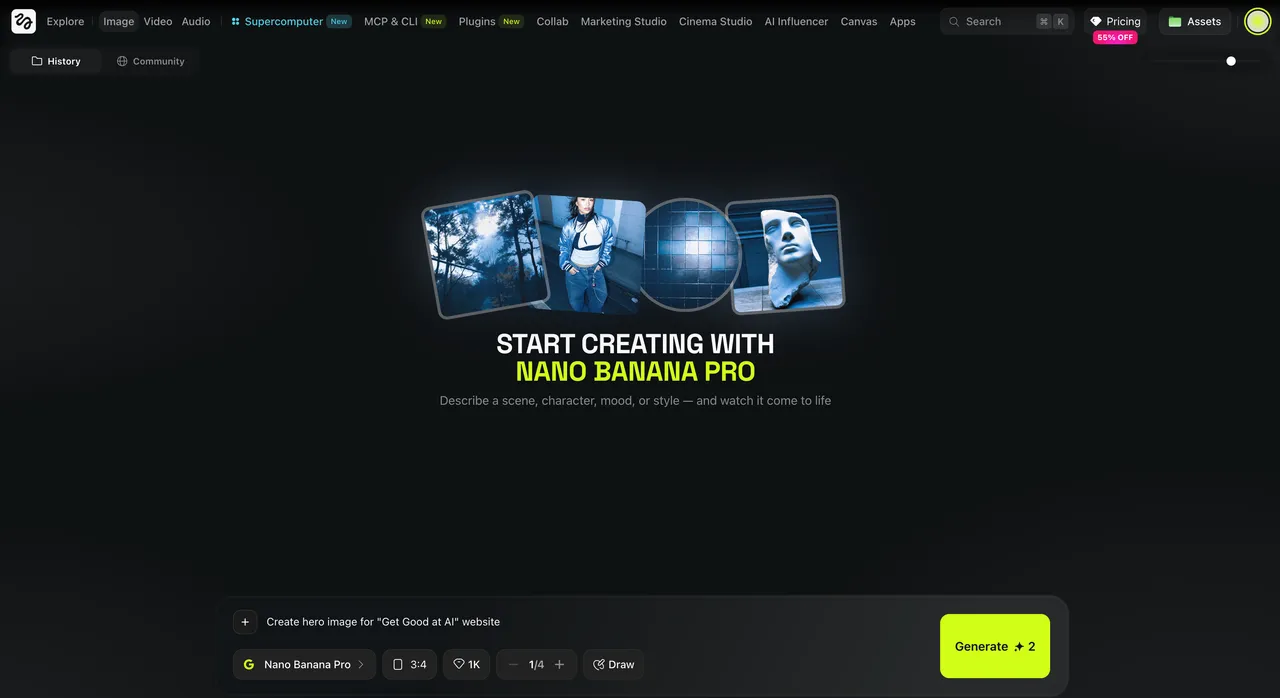
Higgsfield AI is an AI video and image generation platform whose signature feature is controllable cinematic camera motion. Instead of hoping a model invents a good shot, you choose how the camera behaves — a slow dolly push, a crash zoom, a bullet-time spin, an FPV drone sweep — and apply it to a prompt or an uploaded image. Under the hood it aggregates many leading models (Sora, Veo, Kling, WAN, Seedance and more for video; image models like Nano Banana Pro and Soul), so one subscription reaches tools you’d otherwise juggle across separate apps. The result is a tool aimed squarely at people who want film-style movement without a 3D rig or a video editing background.
The platform handles a large volume of generations daily, which signals it’s a real, actively used product rather than a demo. That scale also explains the credit-based billing, which we’ll cover below.
How to use Higgsfield AI
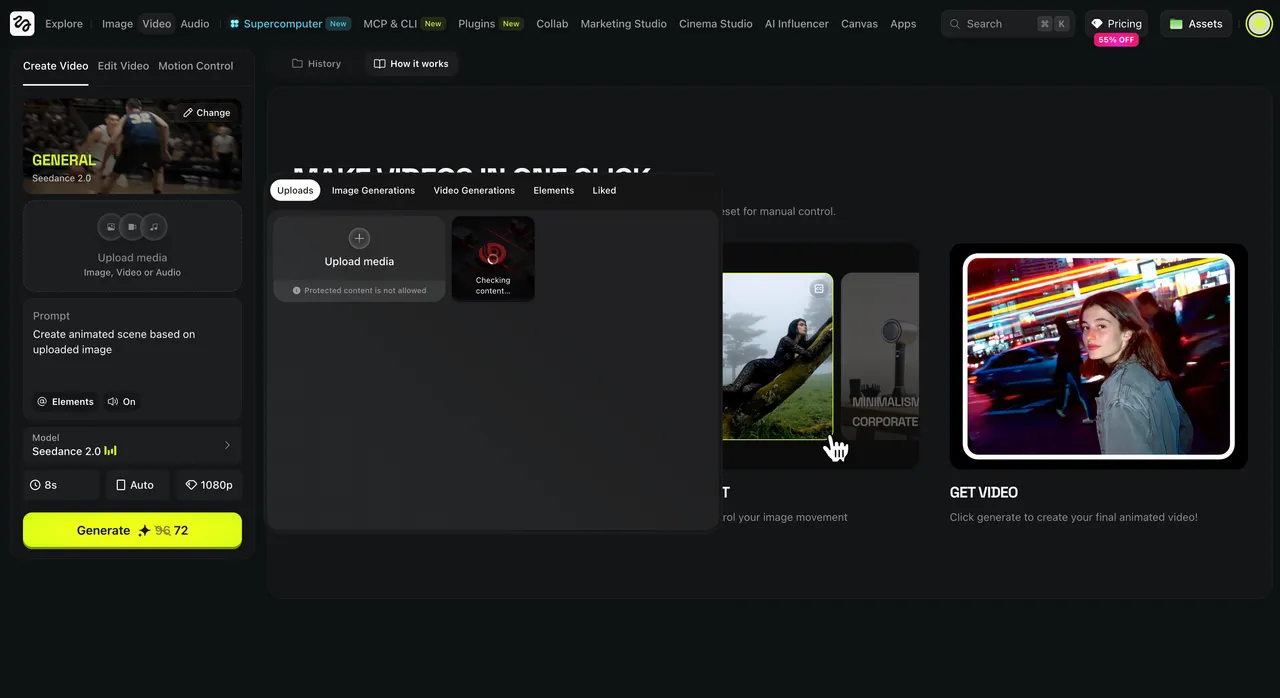
Getting from an idea to a finished clip follows a short loop:
- Sign up and open the studio. Go to higgsfield.ai and create an account — it runs in the browser, no install. New users usually get a small daily credit allowance to test.
- Start from a prompt or an image. For prompt-to-video, describe the scene. For image-to-video, upload a still — a product shot, a character, a landscape — that you want to bring to life.
- Pick a model. Choose from the available video models. Standard models cost fewer credits; premium ones (such as Sora or Veo) cost more per generation, so match the model to how important the shot is.
- Choose camera motion or an effect. This is the core step. Select a camera-motion preset (dolly, crash zoom, bullet time, FPV, 360 rotation, and others) or a viral effect preset. You can pair motion with an effect for a stronger result.
- Set length and generate. Pick the clip length, confirm the credit cost shown, and generate. Clips are short by design, so plan longer scenes as several shots.
- Review, refine, and download. Watch the result, regenerate or tweak the prompt if needed, then download. Stitch multiple clips in any editor for a longer sequence.
That’s the workflow: prompt or image → model → motion → generate → download. Because the camera move is a preset rather than a manual keyframe job, the time from idea to usable shot is short.
Key features
- Cinematic camera controls — a library of motion presets (dolly, crash zoom, bullet time, FPV sweep, 360 rotation and more) you apply with one click.
- Image-to-video — animate a single still into a moving shot while keeping the subject consistent.
- Effect presets — heavy visual effects (explosions, transformations, surreal scenes) applied without manual compositing.
- Many models, one subscription — access leading video and image models from a single interface instead of separate tools.
- Cinema Studio — a flagship mode for more controlled, professional-looking cinematic scenes.
- Sound sync and HD output — generations come with synced audio and sharp resolution on supported models.

If you want a sense of how prompt-driven generation works in general before diving in, our Gemini AI photo prompts guide is a useful warm-up on writing prompts that produce predictable results.
Higgsfield AI pricing
Higgsfield AI uses subscription tiers plus a credit system, and the exact prices and plan names change often — so always confirm on the official pricing page (we checked it in 2026). Rather than quote numbers that may already be stale, here’s how the structure works.
You pick a monthly plan that grants a fixed pool of credits. Each generation spends credits based on the model and clip length: standard models are cheap, premium models like Sora or Veo cost far more per clip. The key catch is that monthly credits do not roll over — they reset each billing cycle. Separately, you can buy credit top-up packs (priced roughly per hundred credits), but those reportedly expire after about 90 days. Annual billing usually lowers the effective monthly rate on the larger plans.
| Plan tier | Roughly who it’s for | What you get |
|---|---|---|
| Entry / low-cost | Trying it out, occasional clips | Small monthly credit pool, basic models |
| Mid (Plus) | Regular creators, social content | Larger credit pool, premium models unlocked |
| High (Ultra) | Heavy users, agencies | Large credit pool, priority generation |
| Business / team | Studios, multi-seat teams | Per-seat credits, collaboration |
The practical advice: estimate how many clips you’ll make per month and on which models, then pick the smallest plan that covers it. Because credits expire, an oversized plan wastes money, and an undersized one leaves you topping up at a premium.
Best use cases
- Social and short-form video — punchy, motion-rich clips for Reels, TikTok, and Shorts.
- Product and brand shots — animate a static product image into a rotating or pushing-in hero shot.
- Music and mood pieces — string cinematic shots into a stylized sequence.
- Concept and pitch visuals — show a scene in motion before committing to a full shoot.
- Character content — keep a consistent character across multiple shots and scenes.
Tips for getting better results
A few habits that improved our output noticeably:
- Match the model to the stakes. Use cheap standard models to test framing, then re-run the keeper on a premium model.
- Start with a strong still. For image-to-video, a clean, well-composed input image produces a far better animated result than a noisy one.
- One motion per clip. Layering several camera moves into one short clip usually muddies it; keep each shot to a single clear move.
- Plan longer scenes as shots. Clip lengths are short, so storyboard a sequence and stitch shots in an editor.
- Watch your credit cycle. Since credits don’t roll over, batch your generations rather than letting the pool expire unused.
Who is Higgsfield AI for?
Higgsfield is a strong fit for social creators, marketers, indie filmmakers, and small studios who want film-style camera motion without a 3D or VFX pipeline. If your work lives in short, visually striking clips, the preset camera moves and effects save real time. It’s a weaker fit if you need long, perfectly continuous footage, frame-accurate timeline editing, or tight budget predictability — the credit model and short clip lengths will frustrate you there. For its core job — fast, controllable cinematic motion — it’s one of the more capable AI video tools we’ve tested this year.
Higgsfield AI alternatives
- Leonardo AI — strong on AI image generation with its own motion features; a good companion or alternative if images come first.
- Runway — a deeper video suite with editing and longer-form tools, at a steeper learning curve.
- Hedra AI — for talking-avatar / character videos (photo + voice) rather than cinematic camera motion.
- Dreamina AI — CapCut’s image-and-video generator, handy if you edit short-form video there.
- Pika / Kling (direct) — single-model video generators if you prefer one engine over an aggregator.
- Napkin AI — not a video tool, but worth knowing if your real need is explanatory visuals rather than cinematic motion.
See our full library of tool reviews to compare options side by side.
Is Higgsfield AI worth it?
For creators who want cinematic motion without the production overhead, yes — the camera controls genuinely deliver shots that look directed rather than random, and bundling many models behind one login is convenient. The honest catch is the billing: credits don’t roll over, premium models drain them fast, and prices move, so the value depends entirely on matching a plan to your real output. Our rule after testing: pick the smallest plan that covers a typical month, test on cheap models, and spend premium credits only on shots that ship. Treated that way, Higgsfield earns its place in a creator’s stack.
Want more hands-on AI tool breakdowns like this in your inbox? Subscribe for new reviews and guides.
Pros & cons
Pros
- Camera-motion presets give film-style moves without manual keyframing
- One subscription bundles many leading video and image models
- Strong image-to-video: turn a single still into a moving shot
- Viral effect presets apply heavy visual effects in one click
Cons
- Credit-based billing; credits don't roll over each cycle
- Premium models (Sora, Veo) burn credits fast on longer clips
- Pricing and plan names change often — check the current page
- Short clip lengths mean you stitch shots for longer scenes
Frequently asked questions
What is Higgsfield AI?
Higgsfield AI is an AI video and image platform that turns prompts and still images into cinematic clips. Its signature is controllable camera motion — dolly, crash zoom, bullet time, FPV — plus effect presets, all running on top of leading video models in one interface.
Is Higgsfield AI free?
There's no clearly advertised free plan, but new users typically get limited daily credits to try it, often with watermarked output. Real use needs a paid subscription. Check the current pricing page, since the structure changes often.
How much does Higgsfield AI cost?
It uses paid tiers (commonly an entry plan, Plus, Ultra, and a Business/team plan) plus credit top-up packs. Prices shift, so verify on the official pricing page. Annual billing usually lowers the monthly rate on the bigger plans.
How does Higgsfield AI work?
You start from a text prompt or upload an image, pick a video model, choose a camera-motion preset or effect, set length, and generate. Each generation spends credits based on the model and clip length. You then download or refine the clip.
What is image-to-video in Higgsfield AI?
Image-to-video animates a still photo into a moving shot. You upload an image, add a motion prompt or camera preset, and Higgsfield produces a short clip that keeps your subject consistent while the camera or scene moves.
Do Higgsfield AI credits roll over?
No. Monthly subscription credits do not roll over — they reset each billing cycle. Separate top-up credit packs are sold, but those reportedly expire after about 90 days, so plan your output around your cycle.
Which models does Higgsfield AI support?
It aggregates many leading models — including Sora, Veo, Kling, WAN, Seedance, and others for video, plus image models like Nano Banana Pro and Soul. Premium models cost more credits per generation than standard ones.
Who should use Higgsfield AI?
Social creators, marketers, and small studios who want cinematic motion fast. It's less suited to anyone needing long, perfectly continuous footage or a frame-accurate edit timeline — those still call for traditional video tools.
Keep reading

Get good at AI — one practical email a week.
Tools, use cases, and shortcuts you can actually apply. No hype.