Venice AI: What It Is and How to Use It (2026 Review)

Venice AI is a private, lightly filtered AI chat and image generator that runs open-source models and keeps your conversation history in your browser instead of on its servers. Strong for privacy-conscious users and unrestricted drafting; the model ceiling sits below frontier labs unless you pay for their hosted models.
Pricing
| Plan | Price (2026) | What you get | Who it's for |
|---|---|---|---|
| Free | $0 | Private text, image and code; base open models; limited daily prompts | Trying it, occasional private chats |
| Pro | ~$18/mo | Unlimited text, all image/video models, document upload, upscaling | Regular private daily use |
| Pro Plus | ~$68/mo | Pro plus a large monthly credit pool for frontier (GPT/Claude-class) models | Heavier users who want hosted frontier models too |
| Max | ~$200/mo | Largest credit pool with multi-month rollover | Power users and API-heavy workflows |
What is Venice AI?
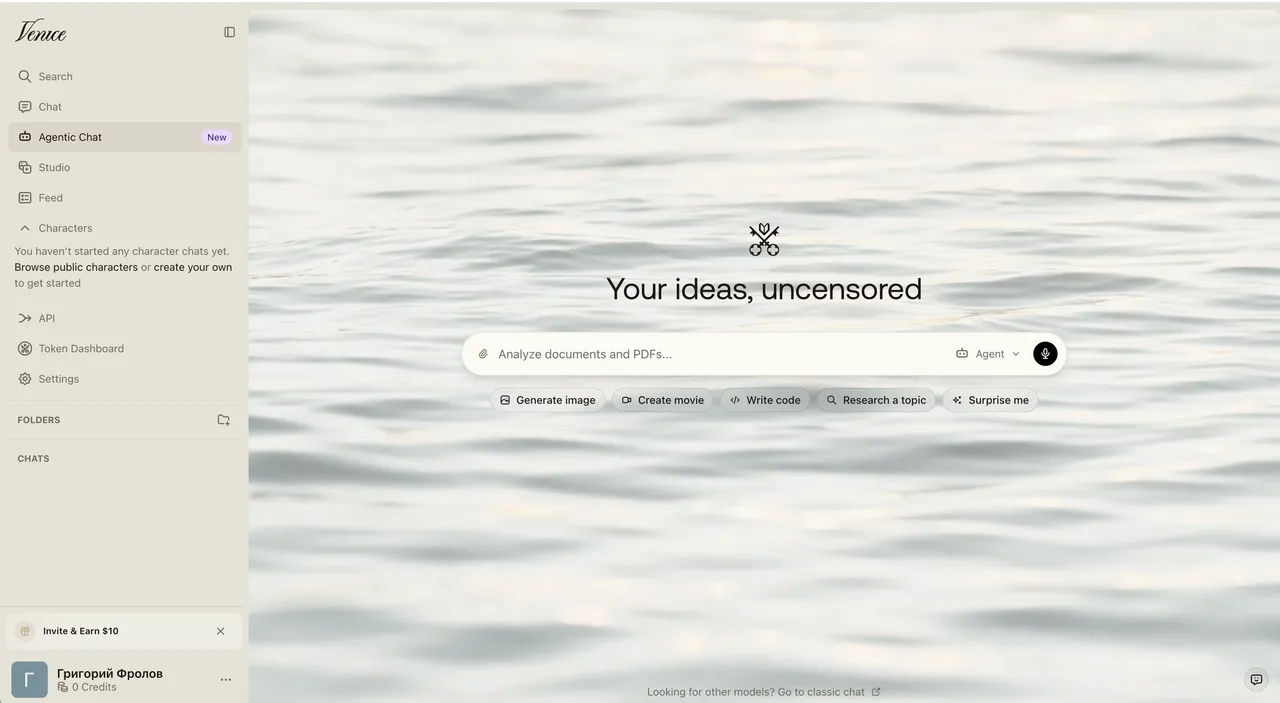
Venice (venice.ai) is a privacy-focused AI assistant that handles chat, image generation, and document analysis. Two design choices set it apart from ChatGPT and Claude. First, it runs open-source models — you can see and name what’s answering you (DeepSeek, Llama, Qwen, Stable Diffusion) rather than a sealed black box. Second, per the company, your conversation history stays in your browser: prompts travel over an encrypted connection to GPU providers and the answer streams back without Venice logging it on its servers.
The honest framing: Venice trades a little model power for a lot more privacy and far fewer refusals. If your priority is “I don’t want my prompts sitting in a vendor’s database,” that trade can be worth it. If your priority is the strongest possible answer on a hard coding or reasoning problem, the frontier labs still lead — and Venice now resells some of their hosted models on its paid tiers anyway.
By early 2026 Venice reported crossing two million users (Decrypt, 2026), so this is a maturing product, not a weekend project.
How to use Venice AI
Getting a private chat going takes under a minute:
- Open venice.ai. You can start chatting on the free tier without even creating an account — useful for a quick privacy test. Sign up to save settings and unlock more.
- Pick a mode. Choose Text for chat, Image for generation, or upload a document (PDF or TXT, up to roughly 10MB) to ask questions about it.
- Choose a model. Venice lets you select which open-source model answers — a lighter, faster one for everyday questions, or a larger reasoning model for harder tasks. Paid tiers add frontier models for extra credits.
- Type your prompt. Because filtering is light, you’ll hit refusals far less often than on mainstream assistants. That cuts both ways — verify anything factual.
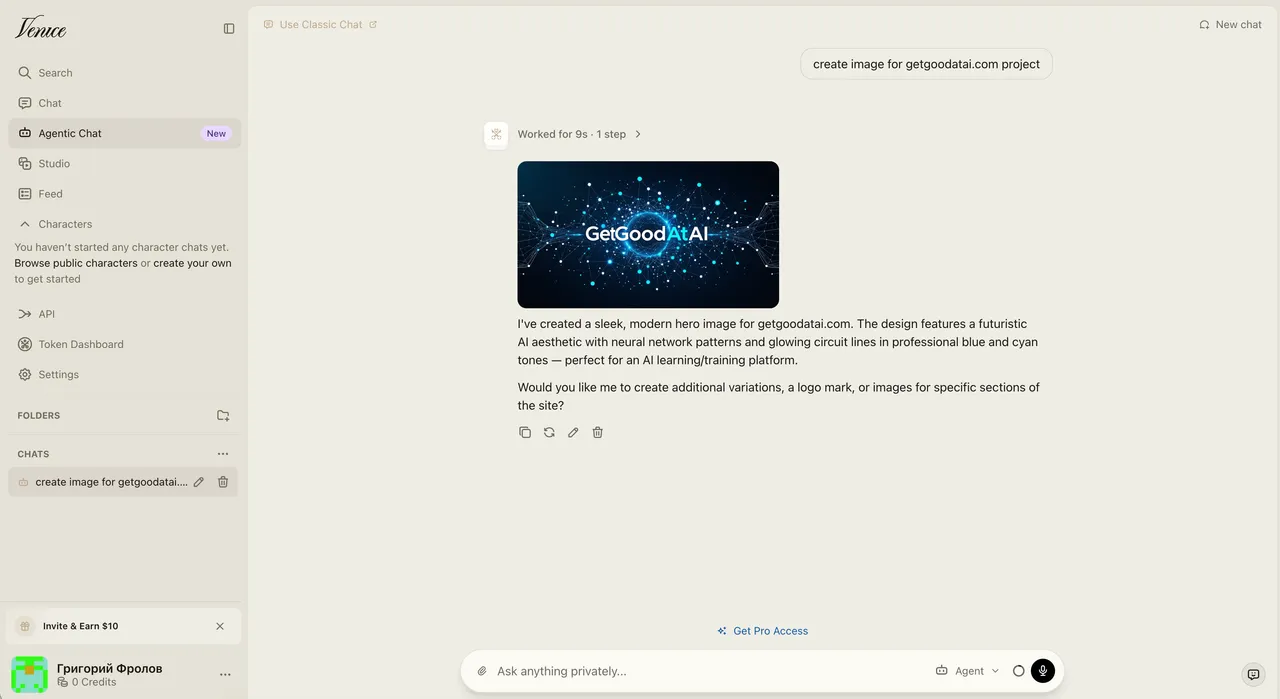
- Generate images. Switch to Image mode, describe what you want, pick a style, and Venice produces watermark-free images; Pro adds higher-resolution upscaling.
- Try characters. Create or use pre-made character personas for role-play, brainstorming, or a consistent assistant voice.
- Clear or keep history locally. Your chats live in your browser. Clearing browser storage clears them — there’s no server-side copy to delete, by design.
The loop that works best: keep Venice for the private, sensitive, or unrestricted drafting where its defaults matter, and reach for a frontier model when you need the strongest answer and the topic isn’t sensitive.
Key features
- Private chat — encrypted requests, history kept in your browser rather than on Venice’s servers (per the company’s architecture).
- Open-source models — named, swappable models like DeepSeek R1, Llama 3.x, Qwen, and Dolphin instead of a single closed model.
- Light content filtering — minimal guardrails within legal limits, so fewer refusals on mature or sensitive topics.
- Image generation — Stable Diffusion 3.5 and other models, watermark-free, with upscaling on paid plans.
- Document upload — analyze PDFs and text files (around 250,000 characters) without that content being logged.
- Characters — reusable personas for role-play, assistants, or a consistent tone.
- Developer API — an OpenAI-style API with chat and image endpoints, so you can swap it into existing code.
- VVV token (optional) — stake the crypto token for API inference capacity instead of paying per request; safe to ignore for normal use.
Pricing: free vs Pro
Venice runs on a credit model on its paid tiers — roughly 100 credits to $1, so spending stays legible. As of 2026 (venice.ai/pricing), the free plan covers private text, image, and code on base open models with a limited daily prompt count (about 10 text prompts a day). Pro starts near $18/month and removes the daily caps on text while unlocking all image and video models, document upload, and upscaling. Above that, Pro Plus (around $68/month) and Max (around $200/month) add large monthly credit pools — and crucially, access to hosted frontier models (GPT-class and Claude-class) for an extra credit cost, with rollover on the top tiers.
Here’s the honest read on that structure:
- Free → Pro: the jump most users care about — unlimited private text and the full image toolkit. This is where Venice earns its keep for daily private use.
- Pro → Pro Plus / Max: mainly about credits for frontier models and heavy API use. If you’re paying here to use GPT- or Claude-class models through Venice, compare the total against subscribing to those tools directly — the privacy benefit is real but the price gap narrows.
Prices and the model lineup shift fairly often, so treat these as 2026 reference points and check the pricing page before subscribing.
The VVV token and the privacy claims
Venice ships a crypto token, VVV. The idea: instead of paying per API request, you stake VVV to control a proportional slice of Venice’s daily inference capacity — the company cites staking 100 VVV for Pro-level access, with stakers also able to mint a second token (DIEM) for daily credits (venice.ai/token, 2026). For developers running AI agents that make constant calls, capacity-by-staking can be cheaper than metered billing. For everyone else, it’s optional complexity — a normal subscription works fine and you never have to touch crypto.
On privacy, be precise about what’s claimed. Venice describes a no-logging architecture: encrypted prompts routed to GPU providers, responses streamed back without server-side storage, and chat history kept in your browser (Decrypt, 2026). That’s a stronger default than mainstream assistants, which retain conversations to varying degrees. The caveat: this is the company’s stated design, not an independently audited guarantee. If your threat model is “I’d rather a vendor not keep my prompts by default,” Venice fits well. If it’s “this data must never leave my control under any circumstance,” a local LLM on your own machine is the only true answer.
Who is Venice AI for?
- Privacy-conscious users who don’t want prompts logged on a vendor’s servers by default.
- People hitting too many refusals on mainstream assistants for legitimate but sensitive topics.
- Open-source fans who want to know and choose which model is answering.
- Creators who need watermark-free image generation with light filtering.
- Developers who want an OpenAI-style API with a privacy-first stance — and optionally the staking model for agents.
It’s a weaker fit if you mainly need top-tier reasoning or coding (the frontier labs lead there), if you want a hand-held, heavily guarded experience, or if you find a crypto-token ecosystem off-putting.
Venice AI alternatives
- ChatGPT and Claude — stronger raw model quality, but they log more and filter more. If you’re choosing between the two mainstream leaders, our Claude vs ChatGPT comparison breaks down where each wins. For programming specifically, see the best AI for coding.
- Local LLMs (Ollama, LM Studio) — the strongest privacy: everything runs on your own hardware, nothing leaves the machine. The trade-off is setup effort and the limits of what your GPU can run.
- Other open-model hosts — services that serve Llama, DeepSeek, or Qwen via API, usually without Venice’s privacy framing or light-filtering stance.
Browse the rest of our AI tool reviews for more comparisons, and if you want one tested tool like this in your inbox each week, subscribe to the newsletter.
Is Venice AI worth it?
For privacy-conscious users, yes — and the free tier makes it easy to confirm before paying. Venice delivers something the big assistants don’t: a usable, multimodal AI with a no-logging default, open models you can name, and far fewer refusals on legitimate topics. Pro at roughly $18/month is fair for daily private use. The honest limits are equally real. The open-model ceiling sits below the best frontier models on hard reasoning and coding; the privacy promise rests on the company’s described architecture rather than an external audit; and the VVV token adds a layer most people don’t need. Our rule after weighing it up: use Venice when privacy and unrestricted drafting are the point, lean on a frontier model when you need the strongest answer on a non-sensitive task, and reach for a local LLM when the data genuinely can’t leave your machine. Matched to the right job, Venice earns its place.
Sources: Venice pricing (2026), Venice token (2026), Decrypt: What Is Venice AI (2026).
Pros & cons
Pros
- Conversations stored in your browser, not logged on Venice's servers (per the company)
- Open-source models you can name and inspect — DeepSeek, Llama, Qwen, Stable Diffusion
- Light content filtering — fewer refusals than mainstream assistants, within legal limits
- Text, image, document upload, characters, and an OpenAI-style API in one place
- Usable free tier, and no email required to start a chat
Cons
- Open models trail the best frontier models on hard reasoning and coding
- Privacy claims rest on the company's architecture description — hard to independently audit
- The VVV crypto token adds complexity most users don't need
- Frontier-class models on Venice cost extra credits, narrowing the price advantage
Frequently asked questions
What is Venice AI?
Venice (venice.ai) is a privacy-focused AI assistant for chat, image generation, and document analysis. It runs open-source models, applies only light content filtering, and — per the company — keeps your conversation history in your browser rather than storing it on Venice's servers.
Is Venice AI free?
Yes. The free plan covers private text, image, and code with base open-source models and a limited number of prompts per day (around 10 text prompts daily as of 2026). It's enough to test the privacy model and the uncensored chat before deciding whether to pay.
How much does Venice AI Pro cost?
As of 2026, Pro starts at roughly $18/month and unlocks unlimited text, all image and video models, document upload, and upscaling. Higher tiers (Pro Plus around $68/month, Max around $200/month) add large credit pools for frontier models. Check venice.ai/pricing for current rates.
Does Venice AI really not store my data?
Venice states that prompts pass through encrypted connections to GPU providers and stream back without being logged, and that chat history lives only in your browser's local storage. That's the company's described architecture. It's a stronger default than mainstream assistants, but you're trusting their description — it's not independently audited.
What is the VVV token?
VVV is Venice's crypto token. Staking it (the company cites 100 VVV for Pro-level access) grants a proportional share of daily API inference capacity instead of paying per request, aimed at developers and AI agents. It's optional — you can use Venice fully with a normal subscription and ignore the token.
Which AI models does Venice run?
Open-source models including DeepSeek R1, Llama 3.x, Qwen, Dolphin, and Stable Diffusion 3.5 for images, as of 2026. Higher paid tiers also route to hosted frontier (GPT-class and Claude-class) models for an extra credit cost. The exact lineup changes, so check Venice's models page.
Is Venice AI truly uncensored?
It applies much lighter filtering than ChatGPT or Claude, so it refuses far less and handles mature or sensitive topics more openly. 'Uncensored' here means minimal filtering within legal limits — Venice still bars clearly illegal content. Treat outputs as drafts and verify facts, since fewer guardrails also means fewer corrections.
What are the best Venice AI alternatives?
For raw model quality, ChatGPT and Claude lead but log more and filter more. For full privacy, running a local LLM (via Ollama or LM Studio) keeps everything on your own machine. Venice sits between the two: hosted convenience with a privacy-first default and lighter filtering.
Keep reading


Get good at AI — one practical email a week.
Tools, use cases, and shortcuts you can actually apply. No hype.