Gamma AI: What It Is and How to Use It (2026 Review)

Gamma AI is the fastest way to go from a rough idea to a presentable deck, doc, or simple website — minutes, not hours. Strongest for first drafts and internal decks; less so for pixel-perfect brand slides. Free credits make it easy to test before paying.
Pricing
| Plan | Price (2026) | AI credits | Who it's for |
|---|---|---|---|
| Free | $0 | One-time starting credits | Trying it out, a deck or two |
| Plus | ~$10/mo (less annually) | Monthly refresh, modest | Regular decks, no Gamma badge |
| Pro | ~$20/mo (less annually) | Monthly refresh, large | Frequent creators, analytics, custom domains |
| Ultra | premium tier | Highest allowance | Power users, biggest generations, newest models |
“Make me a deck about X” is one of the most common requests AI tools promise to handle — and Gamma is the one that actually delivers a usable result most of the time. We tested it on real pitch, training, and report decks. Here’s what it is, how to use it, what the credit system really costs you, and where it stops being the right tool.
What is Gamma AI?
Gamma is an AI-powered tool for creating presentations, documents, and simple websites. You give it a prompt, an outline, or an existing file, and it generates the whole thing: structure, draft text, a visual theme, and images. Instead of slides, Gamma uses cards — flexible blocks that resize to fit content, so you never fight a fixed 16:9 canvas while drafting. Everything lives in the browser, and finished decks can be presented directly, shared as a link, or exported to PowerPoint and PDF.
The honest framing: Gamma is a draft accelerator. It gets you from nothing to “80% of a deck” remarkably fast. The last 20% — your argument, your numbers, your voice — is still your job, and the tool is better when you treat it that way.
How to use Gamma AI
From prompt to shareable deck takes about five minutes:
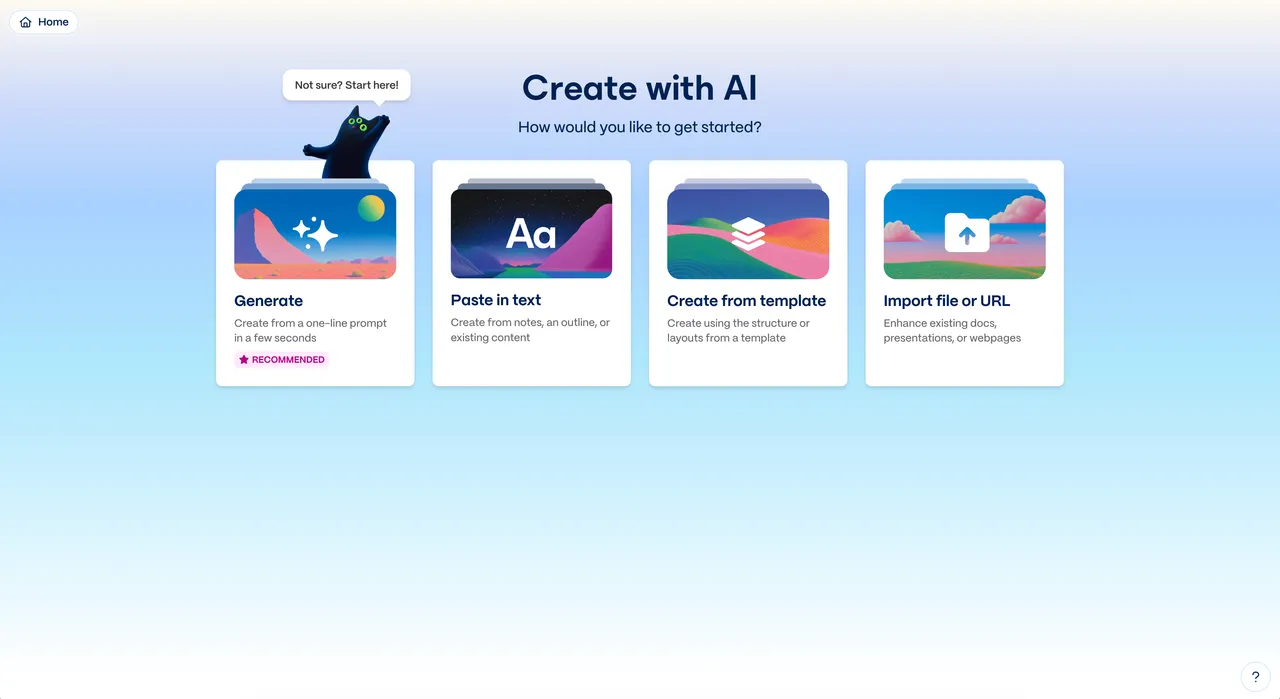
- Sign up at gamma.app. The free plan includes one-time AI credits — no card required. Choose “Create new with AI.”
- Pick a mode. Generate builds from a short prompt; Paste in text turns your notes or outline into cards; Import converts an existing document or PowerPoint file.
- Shape the outline. Gamma proposes a card-by-card outline first. Edit it here — fixing structure before generation beats fixing slides after.
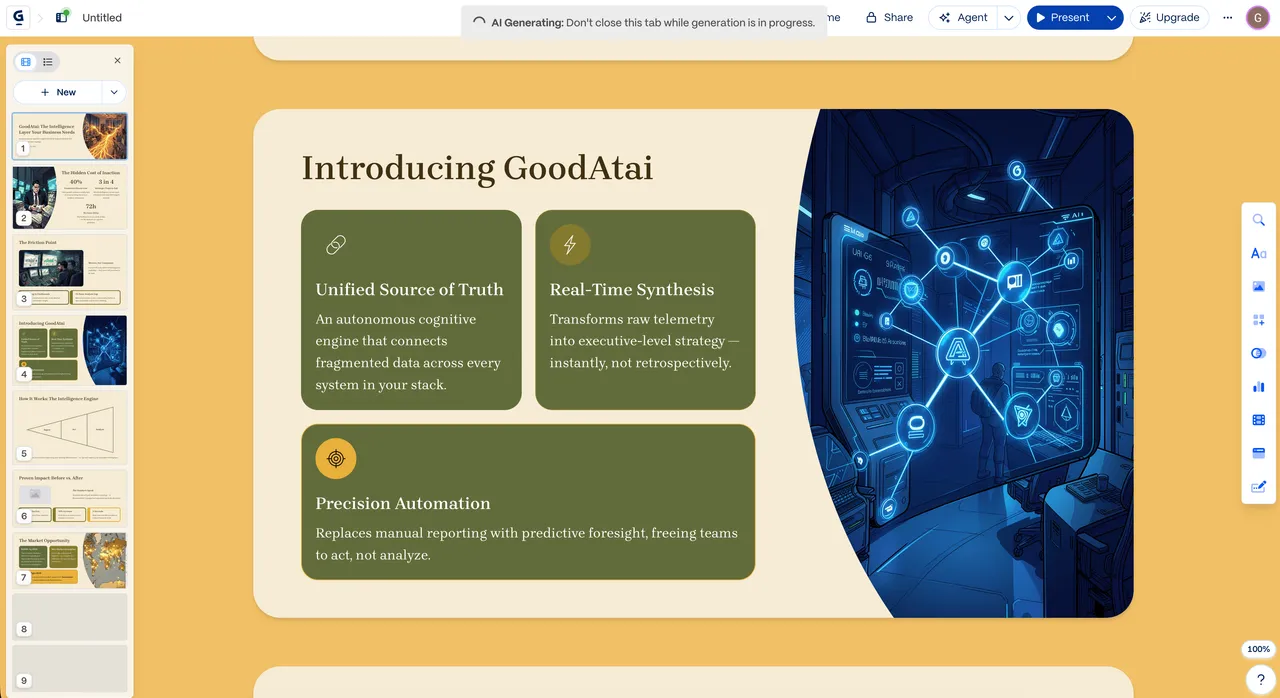
- Choose a theme and generate. Pick a visual theme (fonts, colors, layout style) and let it build the full deck with AI-written text and images.
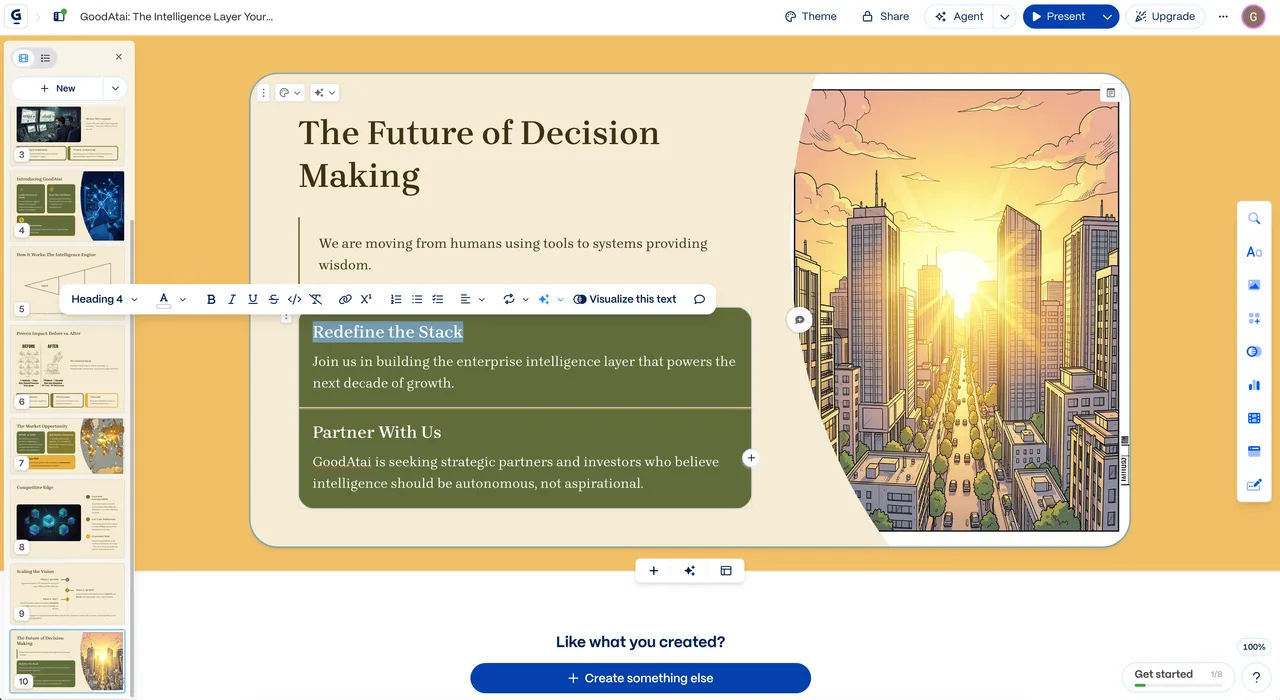
- Edit card by card. Click any text to rewrite it yourself or ask the AI to shorten, expand, or change tone. Swap images, add charts, drag blocks around.
- Restyle if needed. One click applies a different theme to the entire deck — every card updates at once, which is the feature that saves the most fiddling.
- Share or export. Present from the browser, share a live link, or export to PowerPoint or PDF. Websites publish straight to a URL.
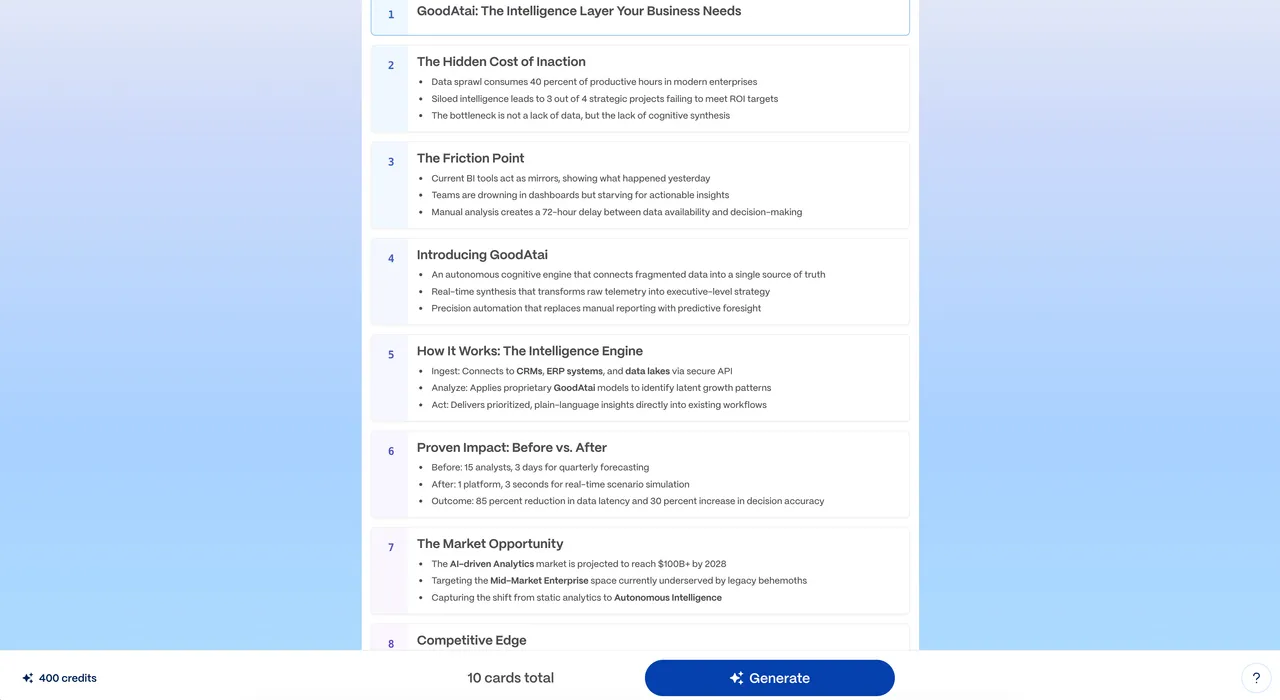
The loop that worked best for us: write a real outline yourself, paste it in, generate, then spend your time editing content — not formatting.
Key features
- Prompt-to-deck generation — full presentations from a one-line prompt or a detailed outline, with AI-drafted text per card.
- Import and transform — turn existing docs, notes, or PowerPoint files into a styled Gamma deck.
- Card-based editor — flexible blocks instead of fixed slides; content reflows instead of overflowing.
- One-click restyle — change the theme and the whole deck updates consistently.
- AI images and editing — generate images in-card, or ask the AI to rewrite, condense, or translate text.
- Three output types — presentations, documents, and one-page websites from the same generator.
- Analytics — see who viewed your shared deck and how far they got (paid tiers).
- Export — PowerPoint (.pptx) and PDF for decks; custom domains for published sites on higher plans.
Pricing: how the credit system works
Gamma runs on AI credits: generating a deck, rewriting text, and creating images each consume some. The free plan gives a one-time batch at signup (enough for a deck or two); paid plans refresh credits monthly and raise how many cards you can generate per prompt. As of 2026 (gamma.app/pricing), Plus runs about $10/month and Pro about $20/month, both cheaper billed annually, with a premium Ultra tier above that for the heaviest users and newest image models. Team and Business plans add per-seat collaboration.
What each step up actually buys you:
- Free → Plus: monthly credit refresh, no “Made with Gamma” badge, bigger generations per prompt.
- Plus → Pro: much larger credit pool, viewer analytics, custom fonts, custom domains for published sites, and longer generations.
- Pro → Ultra: the largest credit allowance, the biggest single generations, and earliest access to new models and features.
Prices and credit amounts shift fairly often, so treat the numbers above as 2026 reference points and check the pricing page before subscribing. The practical advice doesn’t shift: burn the free credits on a real deck you actually need, and only upgrade once you’ve hit the limit doing real work.
Best use cases
- First-draft decks — pitches, internal updates, training material where structure matters more than pixel placement.
- Repurposing content — turning a report, blog post, or meeting notes into a presentable deck in minutes.
- Client-ready docs — proposals and one-pagers that look designed without a designer.
- Quick landing pages — a portfolio, event page, or product teaser published in an afternoon.
- Teaching and workshops — lesson decks where you’re rebuilding similar structures every week.
Tips for better results
A few habits that noticeably improved our output:
- Feed it your outline, not just a topic. “Generate from one line” produces generic decks; pasting real notes produces decks that sound like you.
- Edit the outline stage hard. Cutting and reordering cards before generation is ten times faster than restructuring afterward.
- Rewrite the opening and closing cards yourself. AI drafts the middle fine; the framing is where generic text hurts most.
- Use restyle late. Lock the content first, then pick the theme — otherwise you re-judge the design on every edit.
- Generate images sparingly. They cost credits, and a deck full of AI art reads as filler. For image-heavy creative work, a dedicated generator like Leonardo AI does the job better; paste the results into Gamma.
Who is Gamma for?
Gamma fits founders, marketers, consultants, teachers, and anyone who makes decks regularly but isn’t a designer. If your bottleneck is “blank slide, no time,” it removes most of it. It’s a weaker fit if your decks must match a strict brand system to the pixel (stay in PowerPoint or Figma), if you mostly present dense data (build charts in a real charting tool first), or if you need complex multi-page websites (use a real site builder).
Gamma alternatives
- Napkin AI — a different job: it turns your text into editable diagrams and visuals, not whole decks. The two pair well — Gamma for the deck, Napkin for the explanatory graphics inside it.
- Beautiful.ai / Canva — more design control for presentations; Canva adds a full design suite.
- Tome — narrative-style AI decks, more storytelling-oriented.
- Carrd / Framer — if the website part is your main need.
Browse the rest of our AI tool reviews for more, and if you want one tested tool like this in your inbox each week, subscribe to the newsletter.
Is Gamma AI worth it?
For anyone who builds decks more than once a month, yes — at minimum the free credits, and likely a paid month during deck-heavy stretches. The time savings on first drafts are real and repeatable: what took an evening takes twenty minutes, and the card editor keeps the cleanup pleasant. The honest limits are equally real. Gamma won’t write a persuasive argument for you, the AI text needs your edit pass, and design control tops out below what PowerPoint offers. Our rule after testing: use Gamma to get from zero to structured draft fast, put your own thinking into the cards that matter, and export to your usual tools when polish is the point. Used that way, it earns its spot.
Pros & cons
Pros
- Prompt to full deck in a couple of minutes — real time savings on first drafts
- Card-based editing is simpler than fighting slide layouts
- One-click restyle keeps an entire deck consistent
- Exports to PowerPoint and PDF; also publishes docs and websites
- Free tier with starting credits — no card required to test
Cons
- Credit system means heavy users hit limits and need a paid plan
- AI text is a competent first draft, not a finished narrative
- Less layout control than PowerPoint or Figma for precise brand work
- Templates can look samey if you don't customize
Frequently asked questions
What is Gamma AI?
Gamma (gamma.app) is an AI tool that generates presentations, documents, and simple websites from a text prompt or imported content. It builds the structure, writes draft text, picks a theme, and adds images — then you edit everything in a card-based editor.
Is Gamma AI free?
Yes, there's a free plan with one-time AI credits at signup — enough for a deck or two. Credits on the free plan don't refresh monthly, so regular use requires a paid plan. Paid tiers also remove the 'Made with Gamma' badge.
How much does Gamma AI cost?
As of 2026, Plus is roughly $10/month and Pro roughly $20/month (cheaper billed annually), plus a premium Ultra tier for power users. Each paid tier refreshes AI credits monthly. Check gamma.app/pricing for current rates, as plans change.
How do Gamma credits work?
AI actions — generating a deck, rewriting text, creating images — consume credits. Free accounts get a one-time batch; paid plans refresh credits every month, with higher tiers getting larger allowances and bigger generations per prompt.
Can Gamma export to PowerPoint?
Yes. Decks export to PowerPoint (.pptx) and PDF, so you can finish or present in your usual tools. Docs export to PDF, and Gamma 'sites' publish directly to the web — with custom domains on higher tiers.
Is Gamma better than PowerPoint?
Different jobs. Gamma is faster from zero to a structured draft; PowerPoint gives far more layout control for polished, brand-exact slides. Many people draft in Gamma, export to PowerPoint, and finish there.
Can Gamma build a website?
Yes — the same generator produces simple one-page websites you can publish on a Gamma URL, or on your own custom domain on paid tiers. It suits landing pages and portfolios, not complex multi-page sites.
What are the best Gamma alternatives?
Beautiful.ai and Canva for presentations, Tome for narrative decks, Notion for docs, and Carrd or Framer for simple sites. For diagrams inside your slides, Napkin AI is a better fit — it visualizes ideas rather than building whole decks.
Keep reading



Get good at AI — one practical email a week.
Tools, use cases, and shortcuts you can actually apply. No hype.